How to Validate JSON Online — Fast and Free
How to validate JSON online — find syntax errors instantly, understand what's wrong, and fix trailing commas, unquoted keys, and parse errors in seconds.
JSON validation fails silently in the worst places — a config file with a trailing comma that stops your server from starting, an API payload that rejects with a cryptic parse error, a webhook body that your handler drops because it can’t parse the input. The error message is rarely helpful. “Unexpected token” at position 247 tells you something is wrong but not what or why.
Validating JSON online gives you an immediate answer: is this valid, and if not, where exactly is the problem? Here’s the fastest path — online tools, command line, and in-code — plus what the common errors actually mean.
TL;DR: Paste your JSON into GoGood.dev JSON Compare — it validates both inputs instantly and highlights parse errors at the exact position. For command line:
jq . file.jsonexits with an error and the position if invalid.
What JSON validation actually checks
JSON validation answers one question: does this string conform to the JSON spec? A valid document:
- Uses double quotes for all strings and keys — not single quotes
- Has no trailing commas after the last element in objects or arrays
- Contains no comments (
//or/* */— JSON has no comment syntax) - Uses
true,false,null(lowercase) — notTrue,False,None - Has no
undefined, functions, or JavaScript-specific values - Has properly escaped special characters in strings (
\",\\,\n,\t,\uXXXX)
This is different from schema validation, which checks that the data has the right fields and types. Syntax validation is the prerequisite — invalid JSON can’t be schema-validated. Fix the structure first.
Validate JSON online
Paste your JSON into GoGood.dev JSON Compare. Valid JSON shows a clean interface with no errors:
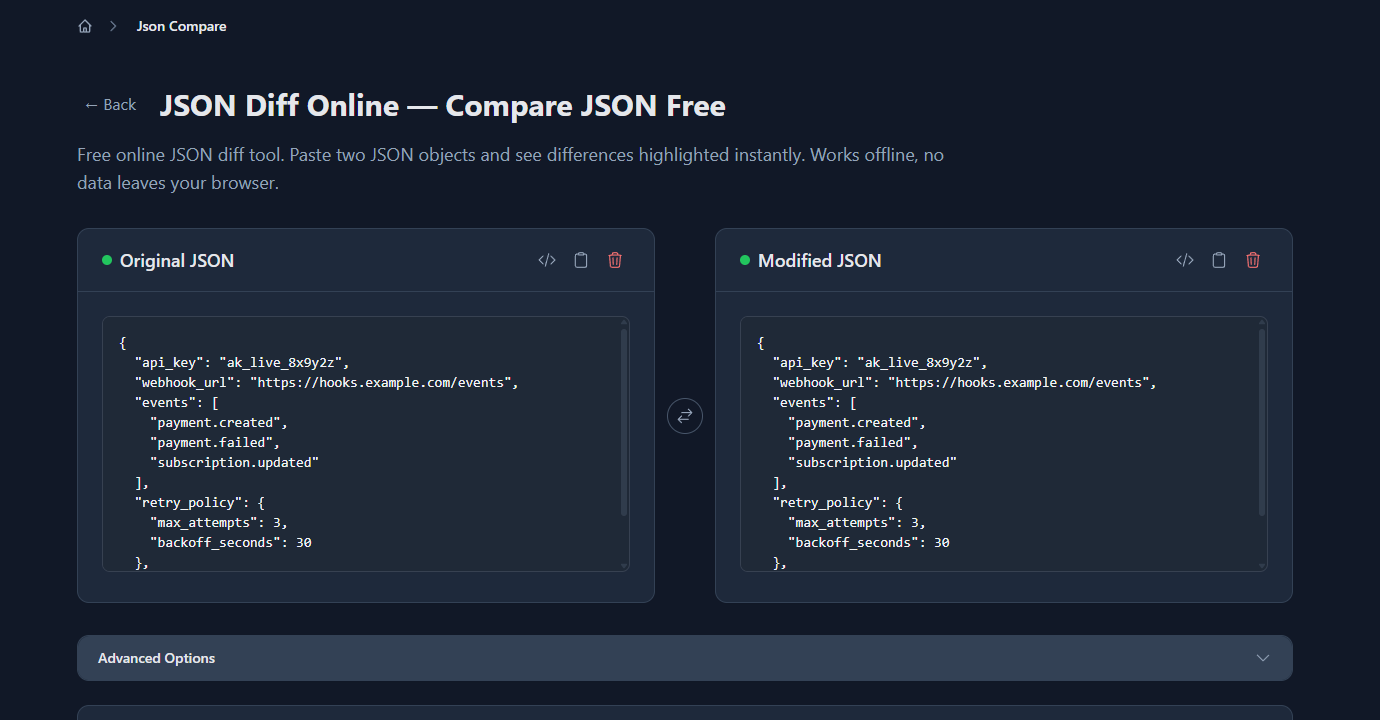
Invalid JSON triggers an immediate parse error with the position and type of the problem:
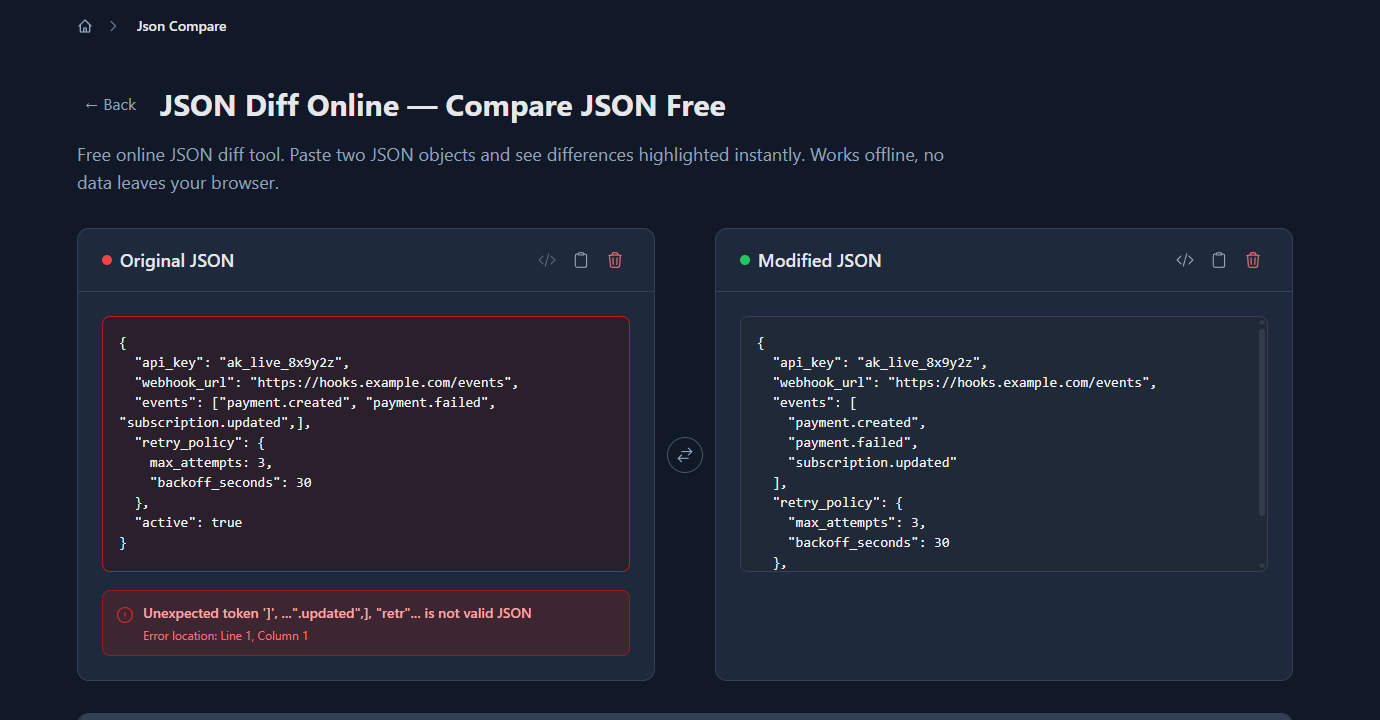
The error message pinpoints where the problem is, which is significantly more useful than “SyntaxError: Unexpected token” with a character position in a minified string.
Validate JSON on the command line
jq — validates and pretty-prints:
# Validate a file
jq . config.json

# Validate piped input
cat response.json | jq .

# Silent validation (exit code only — 0 = valid, 1 = invalid)
jq . config.json > /dev/null && echo "valid" || echo "invalid"
jq exits with code 0 for valid JSON and code 5 for invalid. The error message includes the line and column.
python -m json.tool — built-in, no install:
python -m json.tool config.json
# If valid: pretty-prints the JSON
# If invalid: json.decoder.JSONDecodeError: Expecting ',' delimiter: line 6 column 5 (char 142)
This works on any machine with Python (which is almost everywhere). No jq install needed.
Node.js one-liner:
node -e "JSON.parse(require('fs').readFileSync('config.json', 'utf8')); console.log('valid')"Validate JSON in code
JavaScript:
function isValidJson(str) {
  try {
    JSON.parse(str);
    return true;
  } catch {
    return false;
  }
}

// With error message
function validateJson(str) {
  try {
    const parsed = JSON.parse(str);
    return { valid: true, data: parsed };
  } catch (error) {
    return { valid: false, error: error.message };
  }
}

const result = validateJson('{"name": "Alice", "role": "admin",}');
// { valid: false, error: "Unexpected token } in JSON at position 37" }
Python:
import json

def validate_json(text: str) -> tuple[bool, str]:
    try:
        json.loads(text)
        return True, ''
    except json.JSONDecodeError as e:
        return False, str(e)

valid, error = validate_json('{"name": "Alice", "role": "admin",}')
# (False, 'Expecting property name enclosed in double quotes: line 1 column 37 (char 36)')
Schema validation with Zod (TypeScript):
import { z } from 'zod';

const WebhookConfigSchema = z.object({
  api_key: z.string(),
  webhook_url: z.string().url(),
  events: z.array(z.string()),
  retry_policy: z.object({
    max_attempts: z.number().int().positive(),
    backoff_seconds: z.number().positive()
  }),
  active: z.boolean()
});

// Parse and validate in one step
const result = WebhookConfigSchema.safeParse(JSON.parse(rawJson));
if (!result.success) {
  console.error(result.error.issues);
  // [{code: "invalid_type", path: ["retry_policy", "max_attempts"], message: "Expected number, received string"}]
}
Zod combines JSON parsing with schema validation — it tells you both that the JSON is valid syntax and that the data matches the expected shape.
Common JSON validation errors
Trailing comma
The one developers hit every time they hand-write a JSON config file:
// ❌ Invalid — trailing comma after last element
{
  "name": "Alice",
  "role": "admin",
}

// ✅ Valid
{
  "name": "Alice",
  "role": "admin"
}
The most common JSON error. JavaScript object literals allow trailing commas; the JSON spec does not. This catches developers who copy JS objects into JSON configs.
Unquoted keys
// ❌ Invalid — keys must be quoted strings
{
  name: "Alice",
  role: "admin"
}

// ✅ Valid
{
  "name": "Alice",
  "role": "admin"
}
Valid JavaScript object literal syntax, invalid JSON. Common when developers write JSON by hand rather than serialising.
Single quotes
// ❌ Invalid — single quotes not allowed
{
  'name': 'Alice',
  'role': 'admin'
}

// ✅ Valid — double quotes required
{
  "name": "Alice",
  "role": "admin"
}
Comments
// ❌ Invalid — JSON has no comment syntax
{
  // User configuration
  "name": "Alice",
  "role": "admin"  /* admin access */
}
JSON does not support // or /* */ comments. If you need comments in config files, use YAML (which supports comments) or a format like JSONC (JSON with Comments), which some tools like VS Code settings accept but is not standard JSON.
Wrong boolean/null casing
// ❌ Invalid
{
  "active": True,
  "deleted": None,
  "verified": FALSE
}

// ✅ Valid — lowercase only
{
  "active": true,
  "deleted": null,
  "verified": false
}
Python’s True, False, None are not valid JSON. Always use lowercase true, false, null.
Unescaped special characters in strings
// ❌ Invalid — raw newline in string
{
  "message": "Hello
World"
}

// ✅ Valid — escaped
{
  "message": "Hello\nWorld"
}
Strings in JSON cannot contain literal newlines, tabs, or carriage returns. These must be escaped: \n, \t, \r. Backslashes and double quotes also need escaping: \\, \".
Preventing validation errors
Generate JSON from code, don’t write it by hand:
// ✅ Let JSON.stringify() handle escaping and formatting
const config = {
  name: "Alice",
  role: "admin",
  active: true
};
const jsonStr = JSON.stringify(config, null, 2);
Validate at system boundaries:
If you accept JSON from external sources (API requests, uploaded config files, webhook bodies), validate it immediately on receipt — before passing it to any downstream code:
app.post('/webhook', (req, res) => {
  const body = typeof req.body === 'string'
    ? validateJson(req.body)
    : { valid: true, data: req.body };

  if (!body.valid) {
    return res.status(400).json({ error: 'Invalid JSON body', detail: body.error });
  }

  processWebhook(body.data);
});
Use a linter for JSON config files:
VS Code highlights JSON syntax errors inline. For CI, jq . config.json > /dev/null in a pre-commit hook or pipeline step catches bad config files before they reach production.
FAQ
How do I validate JSON online for free?
Paste into gogood.dev/json-compare — immediate parse error highlighting, no account needed, nothing sent to any server. Command-line: jq . file.json if you have jq, or python -m json.tool file.json if you don’t — Python ships on nearly every machine.
Why does JSON.parse() throw “Unexpected token”?
Trailing comma is the most common cause — JSON doesn’t allow them even though JavaScript object literals do. Other causes: single quotes instead of double, unquoted keys, or a // comment (JSON has no comment syntax). The position number in the error message is where the parser gave up, not necessarily where the mistake is — paste it into a validator to get the highlighted location.
What’s the difference between JSON validation and JSON schema validation?
Syntax validation answers “is this parseable?” — correct quotes, no trailing commas, properly escaped strings. Schema validation answers “is this the right shape?” — required fields present, correct types, values in expected ranges. You need both, in that order. Zod and AJV do both in one step if you give them a schema.
Can JSON have comments?
Standard JSON (RFC 8259) doesn’t support them. Some tools accept JSONC (JSON with Comments) — VS Code’s settings.json being the most common example. But JSONC is not JSON: pass it to JSON.parse() or any standard library and you’ll get a parse error on every // line. If you need comments in config files, use YAML instead — it’s designed for human-written config.
How do I validate JSON in CI?
jq . path/to/config.json > /dev/null exits non-zero on invalid JSON. For multiple files: find . -name "*.json" | xargs jq . > /dev/null. Add it as a step before your build. This catches the trailing-comma-in-config-that-silently-breaks-startup class of bugs before they reach production — and they always reach production on a Friday if you don’t.
Validation is the cheapest debugging step there is. Two seconds of pasting beats two hours of tracing a “Unexpected token” error through a minified stack trace. Validate at the boundary, add a jq check to your pipeline, and move on.
For what comes next: Common JSON Errors and How to Debug Them covers structural bugs beyond syntax, and How to Find Exactly What Changed in a JSON Payload covers comparison once the JSON is valid.