How to Compare Two JSON Files Online
The fastest way to compare two JSON files online — paste, diff, done. No setup, no login, works in your browser. Includes CLI and code options too.
You have two JSON files — a config from staging, a config from production, or an API response from before and after a deploy. Something is different between them. The question is: what exactly?
Opening both in a text editor and scrolling side-by-side doesn’t scale past 20–30 lines. At 100+ lines, you’re going to miss something. A renamed key, a changed default, a field that silently disappeared — these are exactly the kinds of differences that don’t jump out when you’re scanning.
This post covers the fastest ways to compare two JSON files, from browser tools to command-line options.
TL;DR: The quickest way is to paste both JSON objects into GoGood.dev JSON Compare — it highlights every difference instantly, with syntax coloring and a line-by-line diff. No login required.
What “comparing JSON files” actually means
When developers say they want to compare two JSON files, they usually want one of two things:
Structural diff — what keys were added, removed, or changed? This is semantic: it understands that {"a":1,"b":2} and {"b":2,"a":1} are identical even though the key order differs.
Text diff — what lines are different between the two files? This is what git diff gives you. It’s fast and familiar, but it will flag property reordering as a change even when the data is identical.
For most debugging scenarios — comparing API responses, environment configs, migration outputs — you want the structural diff. It tells you what actually changed, not what the text representation looks like.
Option 1: Online JSON comparison tool (fastest)
For a one-off comparison, an online tool is by far the fastest path. No installation, no command to look up, works on any machine.
How to use it:
- Open gogood.dev/json-compare
- Paste your first JSON into the Original JSON panel on the left
- Paste your second JSON into the Modified JSON panel on the right
- The diff appears instantly — no button to click
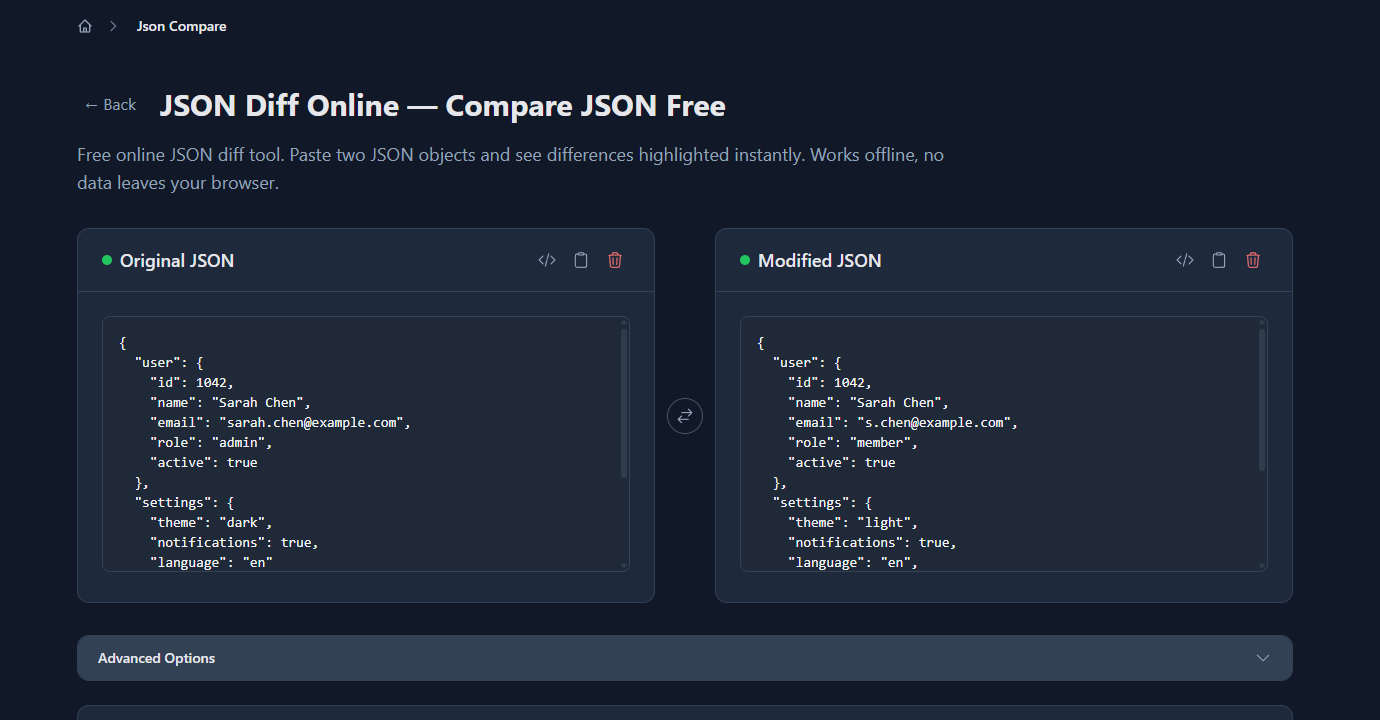
The tool parses both files, compares them structurally, and highlights the result in a side-by-side view. Changed lines are marked in yellow, added lines in green, removed lines in red.
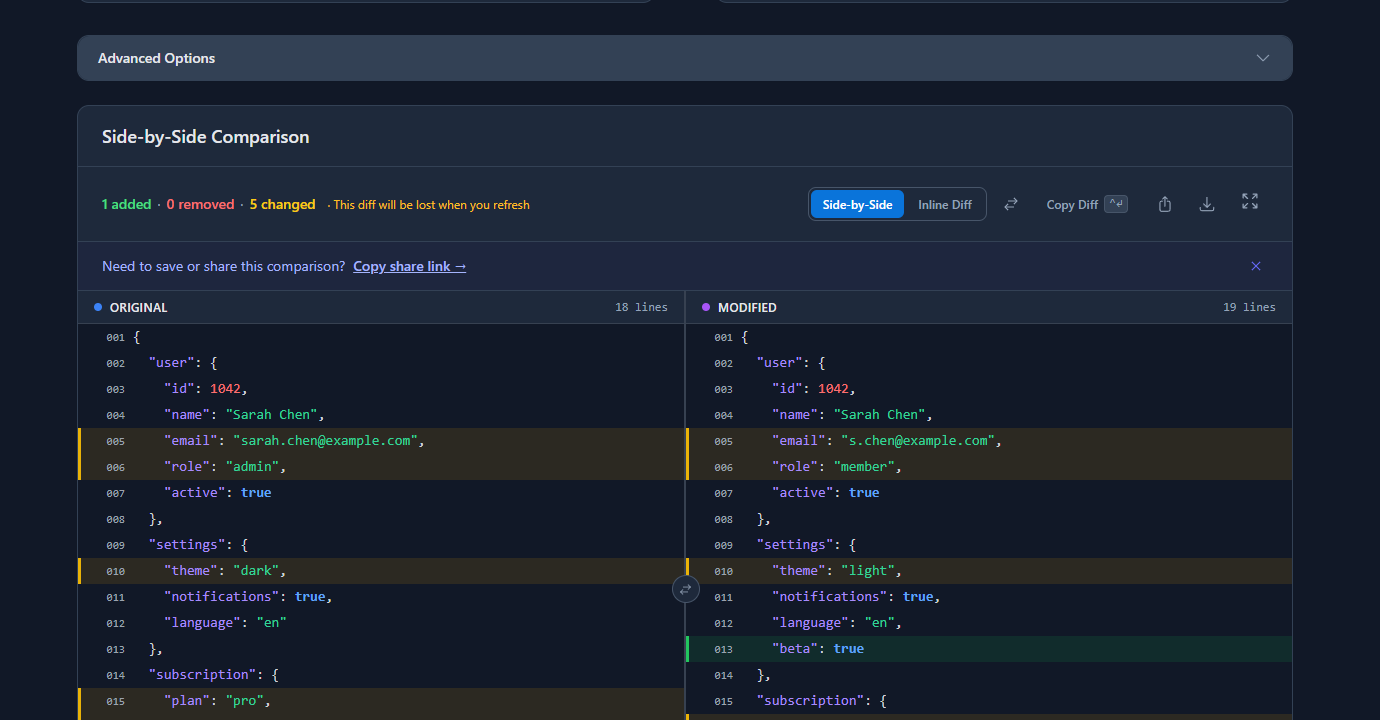
In the example above: the tool found 1 added field and 5 changed values — email, role, theme, subscription plan, and expiry date — across a 20-line JSON object. That would have taken several minutes to spot manually.
What it handles well:
- JSON files up to 50MB
- Nested objects and arrays
- Property reordering (won’t flag as a change)
- Invalid JSON (shows an error with the exact line number)
When to use something else: If you’re comparing files programmatically in a script or CI pipeline, jump to the CLI or code options below.
Option 2: Command line with jq
jq is a lightweight JSON processor available on macOS, Linux, and Windows (via WSL or Scoop). It can diff two JSON files with a few lines.
Install:
# macOS
brew install jq

# Ubuntu/Debian
apt-get install jq

# Windows (Scoop)
scoop install jq
Compare two files:
diff <(jq --sort-keys . file1.json) <(jq --sort-keys . file2.json)The --sort-keys flag normalises property order before diffing, so reordered keys don’t show up as changes. The output is a standard unified diff.
Show only which keys differ (no values):
diff <(jq 'keys[]' file1.json) <(jq 'keys[]' file2.json)Limitation: jq diff is text-based — it shows line differences in the formatted output, not semantic field differences. If a nested value changes, you’ll see the surrounding lines too.
Option 3: Node.js one-liner
If you have Node.js available and want a quick semantic comparison in a script:
const a = require('./file1.json');
const b = require('./file2.json');

function diff(obj1, obj2, path = '') {
  const keys = new Set([...Object.keys(obj1), ...Object.keys(obj2)]);
  for (const key of keys) {
    const fullPath = path ? `${path}.${key}` : key;
    if (!(key in obj1)) {
      console.log(`+ ${fullPath}: ${JSON.stringify(obj2[key])}`);
    } else if (!(key in obj2)) {
      console.log(`- ${fullPath}: ${JSON.stringify(obj1[key])}`);
    } else if (typeof obj1[key] === 'object' && typeof obj2[key] === 'object') {
      diff(obj1[key], obj2[key], fullPath);
    } else if (JSON.stringify(obj1[key]) !== JSON.stringify(obj2[key])) {
      console.log(`~ ${fullPath}: ${JSON.stringify(obj1[key])} → ${JSON.stringify(obj2[key])}`);
    }
  }
}

diff(a, b);
Run with:
node compare.jsOutput:
~ user.email: "sarah.chen@example.com" → "s.chen@example.com"
~ user.role: "admin" → "member"
~ settings.theme: "dark" → "light"
+ settings.beta: true
~ subscription.plan: "pro" → "free"
~ subscription.expires: "2026-12-31" → "2026-06-30"
This is path-based output — each difference includes the full dot-notation path to the changed value. Easy to pipe into a log or assertion.
Option 4: Python (no dependencies)
If you’re in a Python environment:
import json
import sys

def diff(a, b, path=""):
    if isinstance(a, dict) and isinstance(b, dict):
        for key in set(list(a.keys()) + list(b.keys())):
            full = f"{path}.{key}" if path else key
            if key not in a:
                print(f"+ {full}: {json.dumps(b[key])}")
            elif key not in b:
                print(f"- {full}: {json.dumps(a[key])}")
            else:
                diff(a[key], b[key], full)
    elif a != b:
        print(f"~ {path}: {json.dumps(a)} → {json.dumps(b)}")

with open(sys.argv[1]) as f1, open(sys.argv[2]) as f2:
    diff(json.load(f1), json.load(f2))
Run with:
python compare.py file1.json file2.jsonNo pip installs needed — uses only the standard library.
Common problems when comparing JSON files
“The diff shows everything as changed”
Usually caused by comparing minified JSON against pretty-printed JSON, or by a BOM (byte order mark) at the start of a file. Run both files through a formatter first:
jq . file1.json > file1-clean.json
jq . file2.json > file2-clean.json
diff file1-clean.json file2-clean.json
Or paste both into an online tool — it formats on the fly and the diff is always structural, not text-based.
“Array differences are confusing”
If your JSON contains arrays, the diff output depends on whether the tool matches by position or by value. A tool that matches by position will flag every element as changed if one item is inserted at the start. A semantic diff tool matches array items by their content (or by a key field like id) and shows only what actually changed.
The GoGood.dev JSON Compare tool has an Ignore Array Order option — enable it when you’re comparing arrays where order doesn’t matter (e.g. a list of permissions or tags).
“My JSON file is huge and the tool is slow”
Online tools typically handle up to 50MB. For larger files, the CLI approach is better:
diff <(jq --sort-keys . huge-file1.json) <(jq --sort-keys . huge-file2.json) | head -100The head -100 cap prevents the terminal from flooding with thousands of diff lines.
“I need to compare JSON inside a CI pipeline”
Use the Node.js or Python script approach, or jq diff in a shell step. Pipe the output to a file and fail the build if it’s non-empty:
diff <(jq --sort-keys . expected.json) <(jq --sort-keys . actual.json) > changes.txt
if [ -s changes.txt ]; then
  echo "JSON mismatch detected:"
  cat changes.txt
  exit 1
fi
FAQ
How do I compare two JSON files online for free?
Paste both files into gogood.dev/json-compare. It’s free, requires no login, and runs entirely in your browser — no data is sent to a server.
What’s the difference between a text diff and a JSON diff?
A text diff compares lines of text — it will flag property reordering as a change even if the data is identical. A JSON diff parses both files and compares the data structure semantically, so {"a":1,"b":2} and {"b":2,"a":1} are correctly identified as equal.
Can I compare JSON files with different key ordering?
Yes. Any structural JSON diff tool (including the online tool above and jq --sort-keys) normalises key order before comparing. Only text-based diff tools like git diff are affected by key ordering.
How do I compare JSON arrays where the order might differ?
Enable “Ignore Array Order” in the online tool, or sort both arrays by a stable key before diffing in code:
const sorted = (arr) => [...arr].sort((a, b) => JSON.stringify(a).localeCompare(JSON.stringify(b)));
diff(sorted(a.items), sorted(b.items));
What if my JSON is invalid?
Paste it into the online tool anyway — it shows the parse error with the exact line and column number, which is faster than tracking down the syntax issue manually.
For most day-to-day comparisons — checking what changed in an API response, reviewing a config before deploying, spotting the difference between two environment files — pasting into an online diff tool takes under ten seconds. For repeated or automated comparisons, the jq or Node.js approach fits naturally into a script or pipeline.
The key thing is using a structural diff, not a text diff — it’s the difference between seeing exactly what changed and wading through noise from formatting differences.
If you’re working with JSON regularly, also worth reading: How to Compare JSON API Responses During Development and JSON Inline Diff: When to Switch from Side-by-Side View.