How to Compare JSON API Responses During Development
Stop eyeballing JSON diffs manually. Learn a faster workflow to compare JSON API responses, catch regressions, and spot breaking changes in seconds.
You push a backend change on Friday. By Monday, a frontend bug report lands in your inbox. You pull up both the old and new API responses — 300 lines of JSON each — and realize you’re about to spend the next hour staring at text.
Eyeballing doesn’t work. A field that flipped from null to 0, a nested object that quietly gained a key, an array that reordered — these changes are invisible at a glance. And this situation comes up constantly: backend refactors, third-party API version bumps, a teammate’s serializer change, a staging environment that drifted from prod.
The fix takes seconds once you know the workflow. Here it is.
TL;DR: Capture both API responses, paste them into GoGood.dev JSON Compare, and see every difference highlighted instantly — no setup, no login, runs in your browser.
What Is a JSON API Response Diff
A JSON diff is a structural comparison between two JSON documents. It tells you which keys were added, removed, or changed — including nested objects and arrays — without flagging whitespace or key reordering as differences.
That second part matters. A plain text diff will show a hundred “changes” when all that happened was pretty-printing. A JSON-aware diff strips that noise and tells you the one thing you actually need: user.role changed from "viewer" to "admin".
Why Developers Need to Compare JSON API Responses
Three situations come up again and again:
Debugging a regression. Frontend broke, you have an old API snapshot from a test fixture or a curl log. Paste both into a diff tool — the culprit is usually visible in under 30 seconds. Without the diff, you’re reading logs and guessing.
Reviewing a backend PR. Your teammate changed a serializer. The code diff shows what changed in the implementation; the API diff shows what changed in the contract. These are different things, and only one of them matters to the frontend. Call the endpoint before and after, paste both, diff.
Validating a third-party API version bump. Don’t trust changelogs — they’re incomplete. Capture responses from both versions yourself. A diff shows you the truth in a few seconds.
How to Compare JSON API Responses — Step by Step
Step 1: Capture both responses
The fastest way is from the browser DevTools Network tab. Open the Network panel, trigger the API call, click the request, and copy the response body. Do this for both the old and new versions.
If you’re working in a terminal, curl with jq makes this clean:
# Capture old response
curl -s https://api.example.com/v1/users/123 | jq '.' > response-v1.json

# Capture new response
curl -s https://api.example.com/v2/users/123 | jq '.' > response-v2.json
For automated regression checks, you can script the comparison with the json-diff Node.js package:
const jsonDiff = require('json-diff');
const v1 = require('./response-v1.json');
const v2 = require('./response-v2.json');

const diff = jsonDiff.diffString(v1, v2);
if (diff) {
  console.log('API response changed:\n', diff);
  process.exit(1); // fail CI
}
Step 2: Paste into a JSON diff tool
Open GoGood.dev JSON Compare. Paste the old response on the left, the new response on the right.
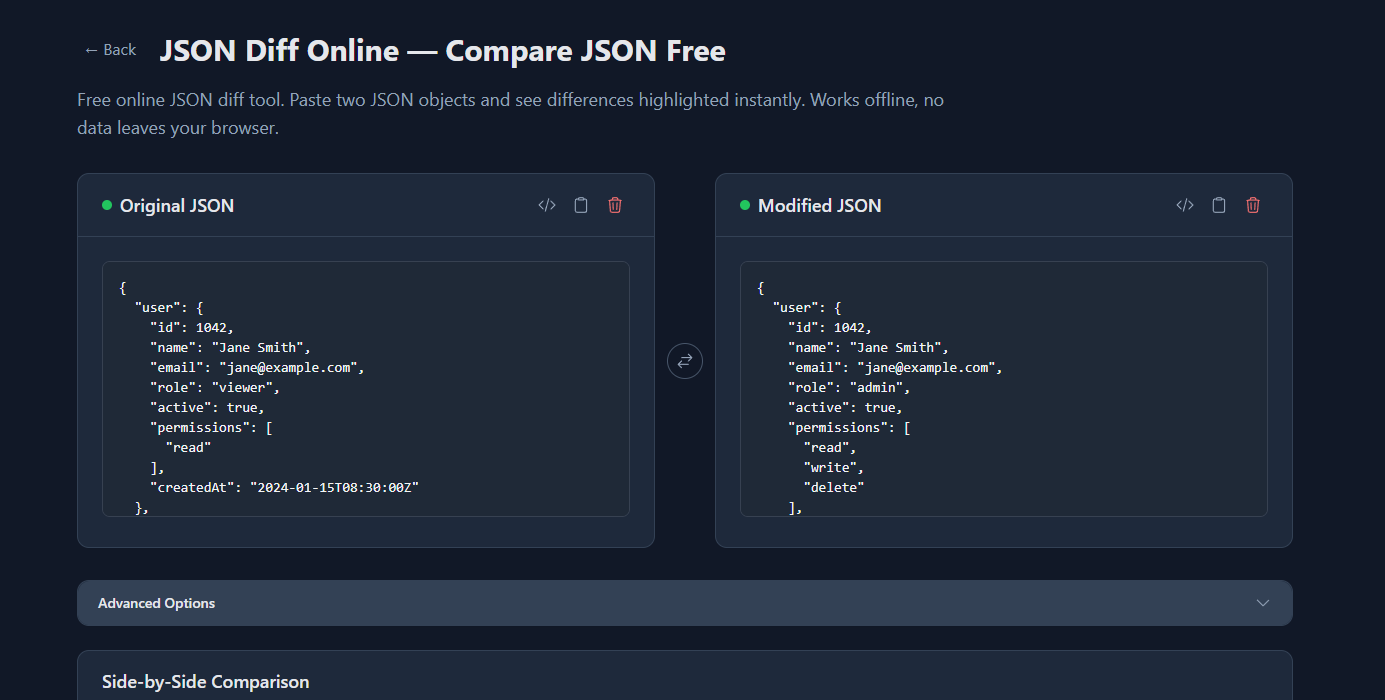
You’ll see:
- Added keys highlighted in green
- Removed keys in red
- Changed values shown inline with old and new side by side
Step 3: Read the diff and act
Once you can see exactly what changed, fixing it is straightforward. No guessing, no re-reading logs. Change the field, re-run the API call, compare again.
Common Problems When Comparing JSON API Responses
Array order differences create false positives. If the API returns an array of objects and the order changed, a naive diff shows every element as modified. Before diffing, normalize arrays by sorting on a stable key:
const normalize = (arr, key) =>
  [...arr].sort((a, b) => String(a[key]).localeCompare(String(b[key])));

const v1Normalized = { ...v1, items: normalize(v1.items, 'id') };
const v2Normalized = { ...v2, items: normalize(v2.items, 'id') };

const diff = jsonDiff.diff(v1Normalized, v2Normalized);
This is the most common source of confusing diffs, and most teams hit it at least once before figuring out why everything appears changed.
Type coercion mismatches. A string "1" and a number 1 are functionally different but visually easy to miss. Always use strict comparison mode if your tool supports it. In raw JSON they’re different types, so a proper JSON diff should catch this — but if you’re comparing responses that went through JavaScript’s loose equality anywhere in the pipeline, be careful.
Stale test fixtures. If you’re comparing a live response to a fixture, the fixture may be months old. Capture fresh responses when possible, or keep fixtures in version control and treat them as part of your API contract.
Huge payloads obscure the real diff. If the JSON is thousands of lines, diffing the whole document is noise. Extract the nested object you care about first:
# Compare just the user.permissions sub-object
jq '.user.permissions' response-v1.json > perm-v1.json
jq '.user.permissions' response-v2.json > perm-v2.json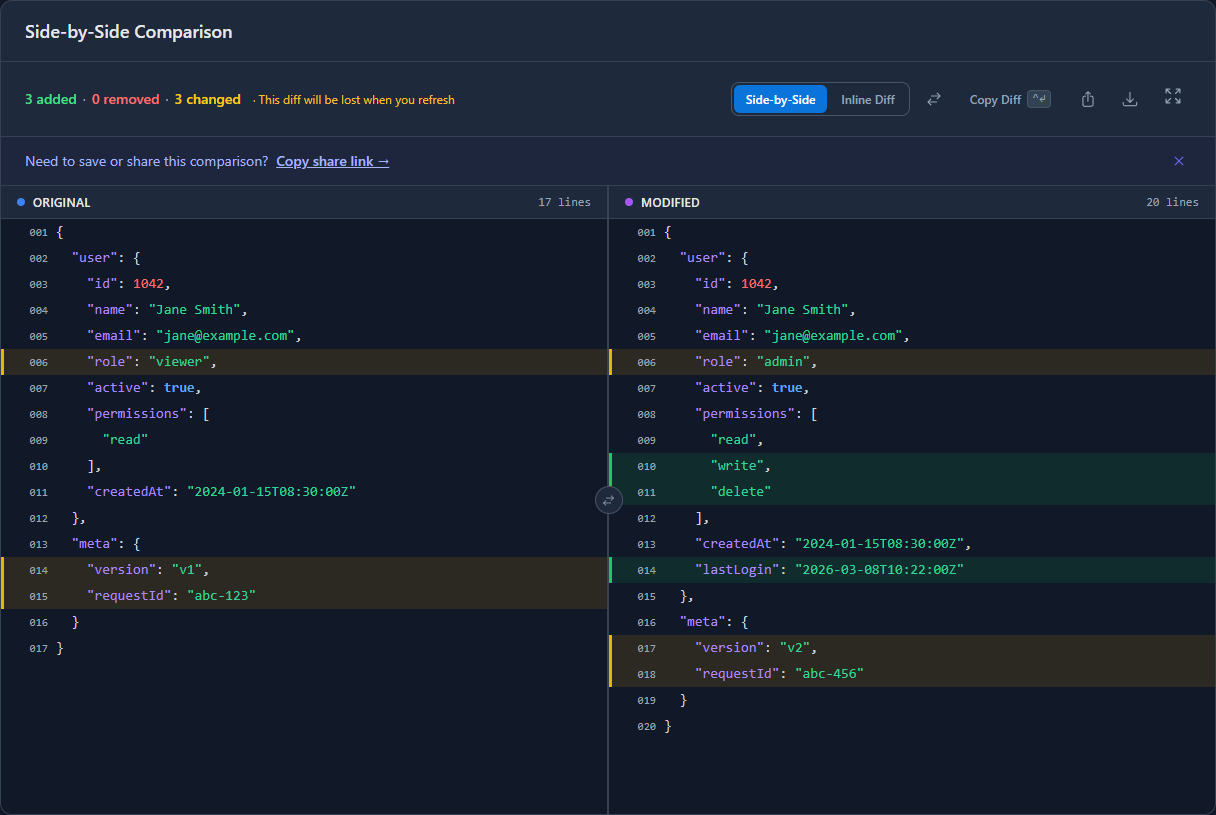
Tools for Comparing JSON API Responses
Browser-based diff tools are the fastest for ad-hoc comparisons. No setup, no install. GoGood.dev JSON Compare handles nested objects, arrays, and type differences, and runs entirely in-browser — nothing is sent to any server.
json-diff (Node.js) is the standard library for scripting comparisons in CI pipelines or test suites. Install with npm install json-diff. It outputs a colored diff to the terminal and can return a structured diff object for programmatic use.
jq is the right tool when you need to preprocess (filter, sort, normalize) before comparing. Pair it with diff for terminal-based comparison:
jq -S '.' response-v1.json > v1-sorted.json
jq -S '.' response-v2.json > v2-sorted.json
diff v1-sorted.json v2-sorted.json
The -S flag sorts keys alphabetically, which eliminates key-order false positives.
Postman has a built-in diff view in its test results, useful if you’re already using it for API testing and want to compare collection runs.
For quick, one-off comparisons during development, a browser tool wins on speed. For systematic regression detection, script it with json-diff in your CI pipeline.
FAQ
How do I compare two JSON API responses without installing anything?
Paste both into GoGood.dev JSON Compare — added keys in green, removed in red, changed values highlighted inline. No account, no install, nothing sent to any server. Works on payloads of any size.
Why does my JSON diff show everything as changed when only a few values changed?
Array ordering. If the API returns an array and item order shifted, a naive diff reports every element as modified even when the values are identical. Sort by a stable key (like id) before comparing. Object key ordering is handled automatically by any decent diff tool — but arrays are positional, and the diff treats that seriously.
Can I automate JSON API response comparison in CI?
Yes — json-diff from npm is the standard approach. Capture the API response in your test, compare it against a baseline, and exit non-zero if the diff is non-empty. This is a legitimate alternative to contract testing for internal APIs: simpler to set up, and it catches actual response changes rather than spec drift.
What’s the difference between a JSON diff and a text diff for API responses?
A text diff compares lines. A key at position 5 in one file and position 2 in another looks like a change. Whitespace, pretty-printing, key reordering — all flagged as differences. A JSON diff compares data: same key regardless of where it appears, whitespace irrelevant. For API responses, text diffs generate noise; JSON diffs generate signal.
How do I compare API responses from two different environments (staging vs production)?
curl both URLs, save to files, diff them. Or grab both from DevTools Network if you have both environments open. For recurring checks — like a nightly staging/prod drift detector — script it: fetch both endpoints, run json-diff, post to Slack if anything changed. This kind of quiet check saves you from discovering drift when a customer does.
Every team has a story about the two-hour debugging session that turned out to be a single field that changed types in an API response. Setting up the comparison workflow takes two minutes. Next time that field changes, you’ll find it in ten seconds. Start with GoGood.dev JSON Compare — paste both responses and the diff is immediate.
Related: How to Compare Two JSON Files Online · Why Your JSON Diff Tool Gives False Positives · How to Debug REST API Responses Like a Senior Developer